


This blog post is caffeine-powered and human-generated. Let us know if you have questions! @science-goblin.bsky.social @fulcrumgenomics.com.bsky.social
Recently I had the opportunity to collaborate with the Samuk Lab at University of California Riverside and add features to pixy, a tool to estimate nucleotide diversity within and between populations. You can find our preprint on bioRxiv.
When an analysis returns an unexpected result, one of the first suspects is the code. The easier it is to read the code and follow its logic, the faster you can rule it out as a culprit. So we focused on making pixy easier to read and test, with the goal of encouraging other scientists to trust, use, and potentially contribute to pixy.
Safe software is what lets you trust a scientific result you didn’t expect. It is:
easy to read and easy to use, so multiple people can contribute and maintain it
dependable: it will do the same job tomorrow that it did today
helpful: the error messages are precise and the logging messages are detailed
If you’re a scientist looking to dabble in writing some code, this post is for you!
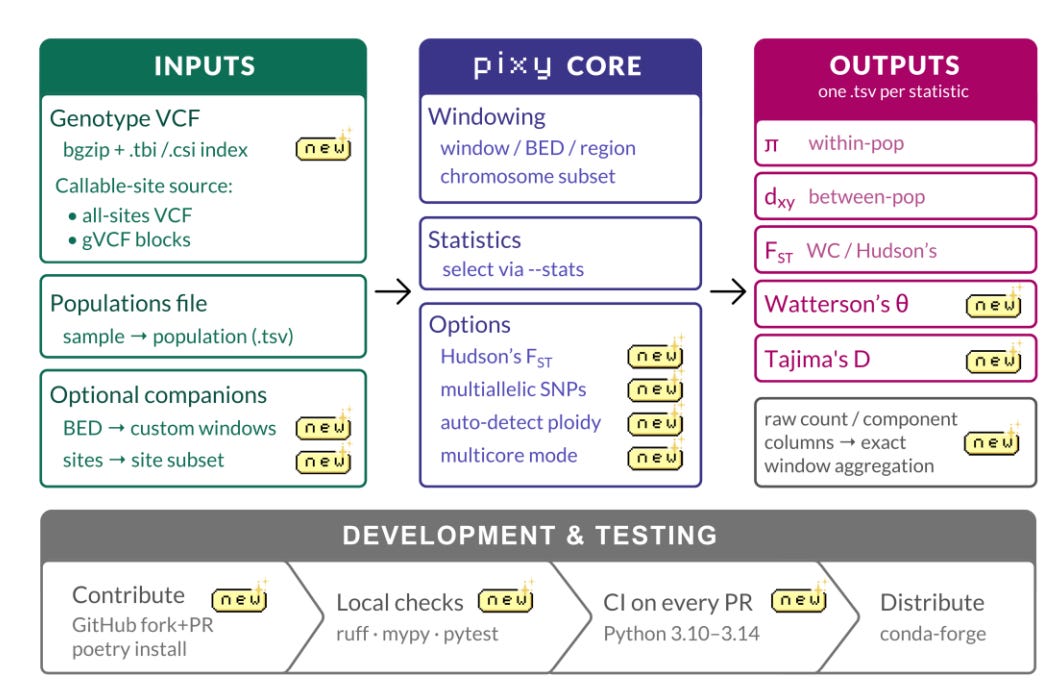
Figure 1. The current state of pixy.
Safety first
Any refactoring project is going to significantly reorganize the code – you introduce new functions, new output files, maybe some new logic. So before you change any code, you need to know what output your current code produces. This will tell you when you introduce some divergence, at which point you can compare the results and decide whether it was intentional or a regression.
Regression testing: did the outputs change?
The first mission is generation of a set of “baseline” outputs captured from the currently existing software. The more code paths you test, the more confident you will be in your results. Ideally you generate a covering set: the smallest collection of inputs that reaches every distinct code path.
Run the generation multiple times to make sure the outputs are deterministic: you need to know that the outputs won’t change every time you run the software. Check for stable row order and stable float formatting in file-based outputs. Ensure that if the tool is multi-threaded, it has no dependence on the order of inputs, processing steps, or produced outputs (i.e., compare using one thread to multiple threads).
These outputs are not about what the software “should do” but what it currently does, and you treat those outputs as the expected results. As you make changes to your software, you periodically cross-check your newly generated results with those expected results. This is your safety net!
If you do hit a bug at this stage (some fault you know you want to correct) – you may want to defer fixing it until the dust of a refactor settles. In the meantime, you can file a GitHub issue, or leave an in-line #TODO comment for yourself.
At some point, you may want to run automated regression testing. If your input data contains very large files, try to subsample the data first to get small and realistic outputs. If the input data cannot be subsampled, consider git-lfs. In the case of Python, pytest-workflow is a tool to compare file-based outputs. Pytest is a standard framework for unit testing.
For pixy, we assembled this work behind-the-scenes in small, reviewed pull requests (PRs) and then opened a mega PR with the changes: we committed the input data, organized the expected_outputs by case, and automated the running of each of our test cases in tests/main/test_main.py.
Unit testing: what piece of code changed my outputs?
Complement regression testing with comprehensive unit testing, where you test one function with a variety of inputs. Test edge cases, valid and invalid inputs – for each case make sure your code is doing what you expect it to. These tests are self-documenting, in that they demonstrate acceptable inputs, so you can use these tests to add to a function docstring, or fall back on them if and when the docstring becomes out-of-date. The unit tests also serve as a guard against anyone in the future introducing a divergence, because they will break. However, unit tests are only as valuable as the functions they cover: if you don’t include a function in your unit tests, you don’t have the same visibility into its behavior. Strive for high test coverage.
Know that some kinds of outputs will change between library versions, compute platforms, and sometimes even using multiple threads. In these cases, it can be defensible to use tools like pytest.approx, which will test that two numbers are similar within a specified tolerance. For pixy, we added unit tests after the regression tests.
Legibility next
With a safety net in place, you can now take the next step in refactoring to make the code more idiomatic. These improvements generally make the code easier to read, thus review, and thus maintain. There’s wiggle room in what “idiomatic” means so this section is full of suggestions.
To make code more readable, add standard formatting and typing conventions and try to reorganize it into a more logical flow. Nested loops can be difficult to trace, multiple branches (e.g., if-else conditions) can be hard to follow. So you want to flatten “control flow”, the order in which the code statements actually execute.
It can be helpful to restructure complex code into independent, testable units, where one function does only one job – this helps with code readability and makes unit testing easier. This is typically the heart of a refactor (read more details here!).
Some other things to keep in mind:
If validation of inputs can happen right away as a first step, then your error checking happens all at the same level, as soon as inputs reach your software. Each function downstream of this trust boundary can assume validated input, and the software does not waste time and resources on invalid inputs.
It can be helpful to remove duplicate and/or unnecessary code, and record data processing steps in a consistent format to support debugging and reproducibility with logging.
In the case of Python, there are formatting and typing conventions that you can follow with tools like ruff or mypy. For pixy, we used both of these tools and made sure to constrain the formatting changes in their own PR.
Feature expansion last
Now you’ve got clean, tested code to iterate with, and you can focus on the exciting science!
When you’re adding new features to a code base, now you can run through your checklist: testing, implementation, linting, and documentation.
In the case of pixy, we had several higher priority features and some other changes that we considered “nice to have”. We based priority on how many users had voted for a feature request, either by opening a GitHub issue or amplifying an already-open issue.
For example, users wanted pixy to be able to ingest CSI-indexed VCF files, because .tbi cannot index chromosomes longer than ~512 Mbp (a normal size in many plant and amphibian genomes). So we added the code to accommodate, as well as a regression testing path and corresponding unit tests (input index files could only have a .tbi or .csi suffix, if the input index was an unknown file format, the user is alerted by a failure message with the cause).
Another highly requested feature was calculation of summary statistics in the context of multiallelic single nucleotide polymorphisms. This was a particularly interesting feature because it is the heart of pixy: what is your denominator, in the case of missing data? We made sure to follow a similar paradigm: we added a new pixy flag, --include-multiallelic-snps as a non-breaking change (meaning the default is to not include them, which was the historical behavior), as well as testing coverage and documentation. In this case, we had historical outputs to which we were comparing from Bailey et al., 2025.
Tactical tips
Keep PRs to <= 500 lines to avoid reviewer fatigue
Keep formatting commits separate from technical commits and PRs to facilitate review
Add test coverage in the same PR
It’s important to write idiomatic code, but it’s also important to match the repo convention and style – try to match pre-existing patterns
One PR can contain one feature
If it’s a particularly large feature, consider a git feature branch in which you open a series of smaller, related PRs
Go forth and write appropriately safe software!
Moving fast in software engineering often means taking many small steps rather than a few large ones. That’s a consistent pattern across most of the projects I take on at Fulcrum, and it works because the science keeps moving while the foundational code improves
Erin McAuley is a Staff Bioinformatics Scientist at Fulcrum Genomics, where she builds bioinformatics pipelines and software for the genomics community. She earned her PhD in Molecular Pathology from the University of Chicago, where she studied the role of adult stem cells in epithelial tissue homeostasis. She previously worked on custom variant callers for hard-to-sequence genes at a clinical genomics startup. You can find her on LinkedIn and GitHub.
Fulcrum Genomics is a bioinformatics consulting firm built by scientists at the forefront of large-scale genomic research, with deep expertise in sequencing technology, pipeline engineering, and genomic data analysis for biotech, pharma, and academia. Engage us through project-based work, fractional R&D, or hourly consulting. Contact us to discuss your project.
